

Design Geometry: Why Thickness Changes Everything in Furniture
Quick Answer: Why does thickness change furniture design?
Thickness isn’t just a measurement — it’s visual weight. Bevels, tapers, undercuts, reveals, and shadow lines can completely change how a piece feels without changing a single dimension. Geometry controls presence, balance, and refinement long before materials or joinery enter the picture.
What You’ll Learn
how thickness affects visual weight
how shadow lines refine mass
how bevels, tapers, and undercuts change presence
how geometry transforms a heavy table without changing dimensions
Geometry of Thickness
How thickness, shadow lines, and small geometric decisions shape the visual weight of furniture.
BY THE END OF THIS STORY
You’ll understand how geometry, proportion, and shadow lines transform a heavy table into refined furniture — without changing a single dimension.
Estimated read time: 14 minutes
Comparison — Thickness vs Geometry Tools
Thickness — raw mass, visual weight, heaviness
Bevels — break the edge, lighten the silhouette
Tapers — shift weight downward, refine stance
Undercuts — hide thickness, create shadow lines
Reveals — add separation, clarify boundaries
Shadow lines — add depth, articulate transitions
Quick Summary
Thickness isn’t about size — it’s about how a piece feels. A heavy table can become refined without changing a single measurement when you use geometry: bevels to break mass, tapers to shift weight, undercuts to hide thickness, reveals to add separation, and shadow lines to create depth. These small decisions stack together, transforming clumsy furniture into intentional design.
Discovering Design
There was a time when I was new to woodworking, and every aspect of it felt like unlocking a new, mysterious, intriguing level as I grew into the craft. There were the tools — learning what they do and how they do it. There was the wood — understanding its behavior, its swelling and shrinking through the seasons. Then the finishing — the way some woods like cherry get blotchy and others don’t. Watching bent laminations fail, and seeing how steam bending wood feels like actual magic.
I absolutely love the fact that I’m a woodworker. Each skill I learn pulls me further down that road.
The most fun skill — at least for me — was design. But design was difficult at first. It was hard seeing what could be. Getting the basic design tool kit brought me to a level where I could finally make a design.
But I’m not a designer — that’s a whole trade on its own. I’m a cabinetmaker. I design from the bench because I know the tools, the limits, and the joinery. That basic tool kit isn’t something you buy — it’s something you learn. And when you’re armed with tools in your head, the tools in your hand become more valuable.
So let’s talk about the tools used for design. There are four we’ll explore. I’ve made a drawing you can download for this story, and I recommend that you do. The download is just a PDF, and it’s free — just click the button.
The tools are:
taper
undercut
bevel
shadow line
Starting Shape
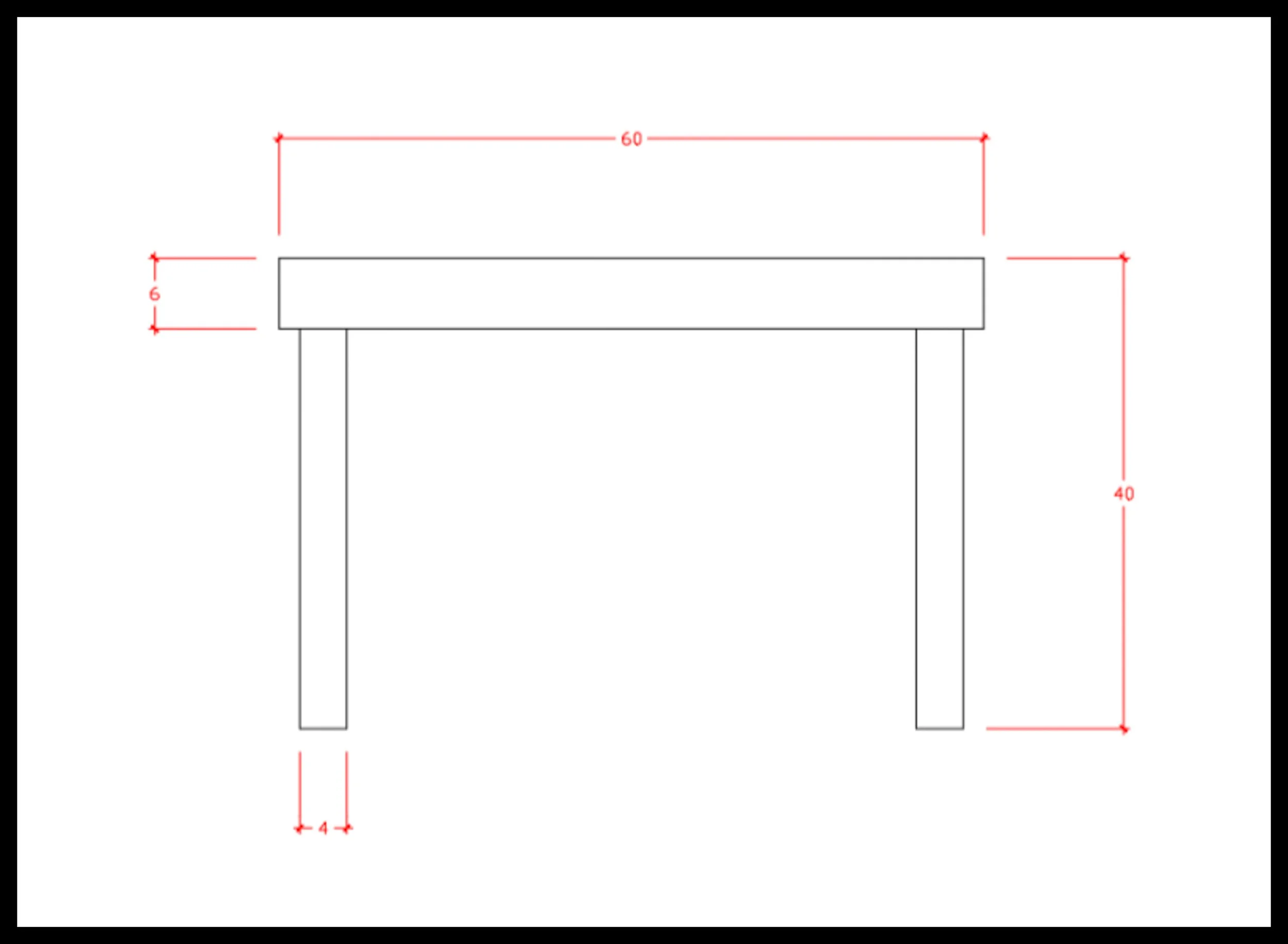
Every design story needs a beginning, and this one starts with a deliberately heavy, awkward form. The table is 40 inches tall with a 6‑inch top and 4‑inch legs — a blocky silhouette that feels stiff, top‑heavy, and visually overbuilt. Nothing about this shape is refined; it’s intentionally clumsy, the kind of geometry that makes a table look like it was drawn with a thick marker instead of a careful hand. This is the raw starting point, the unbalanced mass that shows why thickness is the most misunderstood design decision. From here, each frame reveals how a single design tool — bevel, undercut, taper, or shadow line — reshapes the table’s presence without changing a single measurement.
The Starting Shape — A Heavy, Awkward Table
What we’re going to do is draw a heavy, tall table — the kind you might see in a foyer where the furniture is meant to impress more than it’s meant to be comfortable. It’s intentionally awkward. The proportions are stiff. The mass sits high. Everything about it feels heavy.
The table is 40 inches tall and 60 inches wide. Because this is a teaching diagram, we’re looking at it in 2D, so depth isn’t part of the lesson. The top is 6 inches thick, and the legs are 4 inches thick. That’s it. Three rectangles. No joinery, no grain, no shadows, no tricks.
This is our starting point.
And from this point forward, we will not change the dimensions at all. Not the height. Not the width. Not the thickness of the top. Not the thickness of the legs.
The only thing we will change is geometry.
This is important, because the starting shape is visually heavy. It looks stubborn. It looks slow. It looks like a beginner’s design — not because the measurements are wrong, but because the geometry is undeveloped. As it sits now, it could just as easily be a workbench.
The goal of this lesson is simple:
Lighten the table using geometry alone.
No dimension changes. No cheating. Just the basic design tools woodworkers use every day:
bevels
undercuts
tapers
shadow lines
These tools don’t change the size of the table — they change how the table feels. And that’s the part most woodworkers struggle with: thickness isn’t just a measurement. Thickness is a visual weight decision, and geometry is how you control it.
Overhang Creates a Shadow Line
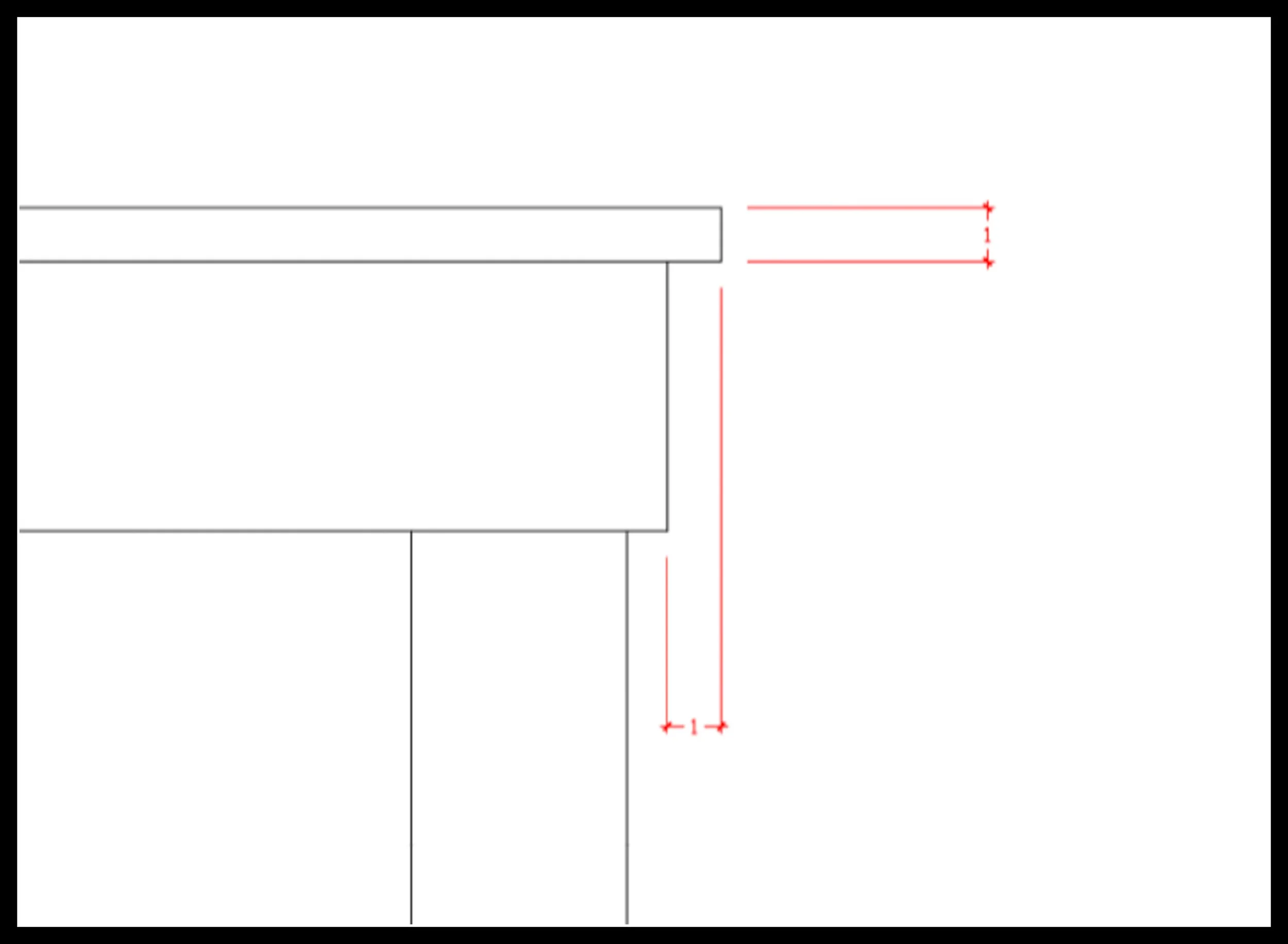
A simple one‑inch overhang is one of the fastest ways to lighten a heavy tabletop. By extending the top past the legs, you create a clean shadow line that visually separates the top from the base. That small gap of darkness does more than add detail — it breaks the blocky silhouette and makes the top feel thinner, almost floating. Nothing structural changes, but the geometry does: the eye reads the table as lighter, more intentional, and far less top‑heavy. This is the first step in reshaping the mass of the design without touching the measurements.
Step 1— Breaking the Top Into Layers
Let’s start with that 6‑inch thick top. Right now it’s a big, stubborn block of wood — visually heavy and sitting on the design like a weight. But that thickness can be broken up with a skirt and a 1‑inch top that has a 1‑inch overhang. That simple change turns the top into two parts.
And that gives us a layer.
Design is filled with layers. Layers create shadows. Shadows create depth. And depth brings a piece to life.
Shadows change through the day as the sun crosses the sky, and interior lighting at night plays across them in a controlled way. That 1‑inch overhang becomes your first shadow line. It’s subtle, but it breaks the mass of the top and immediately lightens the design.
And all we did was take a rectangle and split it in two.
It sounds easy — it should, because it is.
We’re on our way.
Taper Added to the Legs
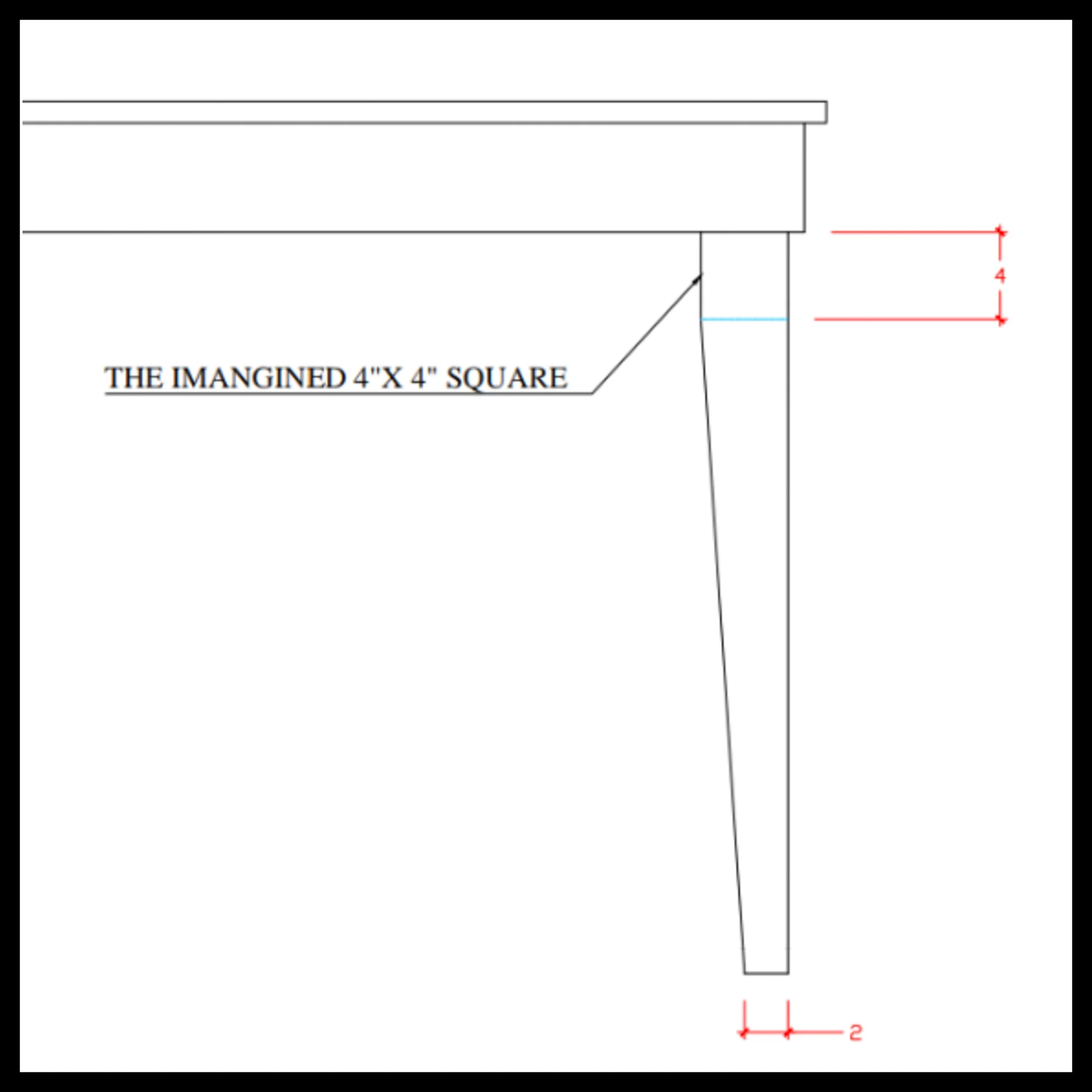
A taper is one of the most reliable ways to move visual weight in a design, and here it immediately changes the table’s stance. By narrowing the legs toward the floor, the mass shifts downward and the whole piece feels less blocky and stiff. The legs stop reading as four solid posts and start behaving like intentional geometry — lighter, more graceful, and more connected to the ground. Nothing structural changes, but the silhouette does: the table now feels balanced instead of top‑heavy, proving how a simple taper can reshape the presence of even the heaviest form.
Step 2— Lightening the Legs With an Inside Taper
Now let’s look at those legs. They’re heavy — visually and physically. We’re going to add another layer by tapering the legs on the inside faces only.
This taper doesn’t run all the way to the top; it stops 4 inches short of the underside of the skirt. Why four inches? Because the leg itself is 4 inches thick. That creates a kind of invisible square at the top of the leg. You won’t consciously see it as a square — it’s just balance. If it’s wrong, you’ll feel it, even if you can’t explain why.
For me, I start almost every taper this way: If the leg is 4 inches thick, the taper begins 4 inches below the skirt. If I don’t like it, I adjust later.
From that starting point, the taper runs down to the foot, reducing the leg to 2×2 inches — half the original thickness. That single decision dramatically lightens both the physical and visual weight of the table.
Geometrically, what we’ve done is remove a triangle from the leg. Another layer. Another break in the mass. And again — it was easy.
The new leg shape introduces angles that guide the eye inward, toward the center of the table. That inward motion gives the piece refinement and a sense of stability — not structural stability, but visual stability, which is just as important in design.
Chamfer as an Undercut
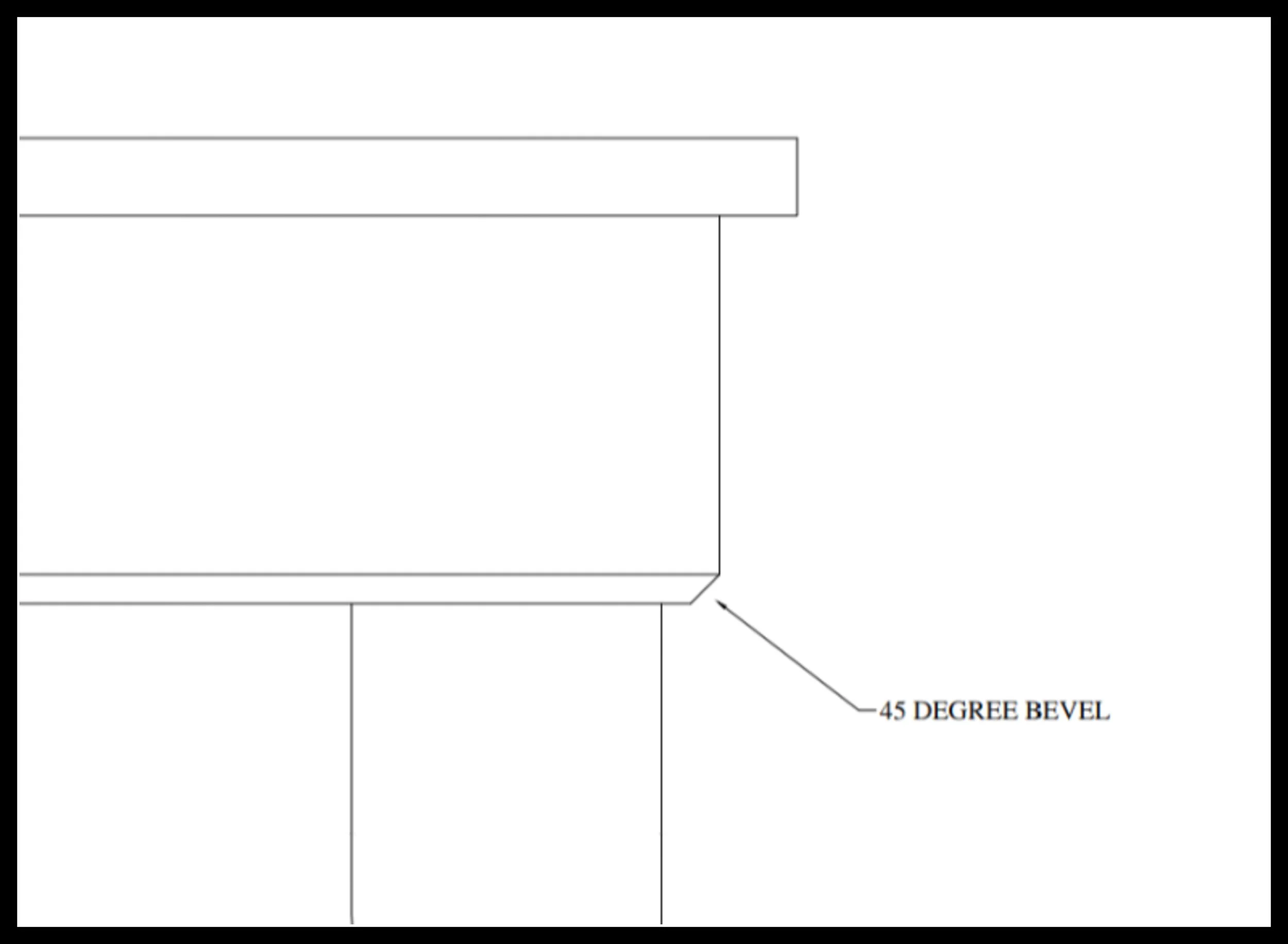
Here, a small chamfer is cut into the underside of the skirt, turning it into a true undercut. Because the angle is hidden from normal viewing height, the eye doesn’t see the chamfer itself — it only sees the effect. The visible thickness of the skirt drops instantly, and a clean shadow line forms beneath the top. On a tall 40‑inch table, this matters even more: height pushes the mass into the viewer’s line of sight, so any heaviness is exaggerated. The undercut quietly delineates the top from the base, breaking the blocky silhouette and restoring balance. It’s one of the quietest geometry tools in furniture design — a tiny recess that dramatically lightens the mass without altering the silhouette, proving how a simple undercut can correct heaviness that measurements alone can’t fix.
Step 3 — Lightening the Skirt With an Undercut
Let’s look at reducing the heftiness of the skirt. A very simple decision is to run a 45° chamfer along the bottom edge. It could just as easily be 30° — I chose 45° because it was easy. That’s the only reason.
This is called an undercut. It creates another layer, and depending on your perspective, it looks different. From a standing position, that undercut disappears from your line of sight. From a seated position, it becomes visible — a small detail that adds another layer of shadow.
This lightens the skirt. It’s a minor detail, and it’s easy to create. But these small details are building toward the final silhouette. They all matter. Every one of them contributes to reducing the visual weight of the table.
Bevel Added to the Top
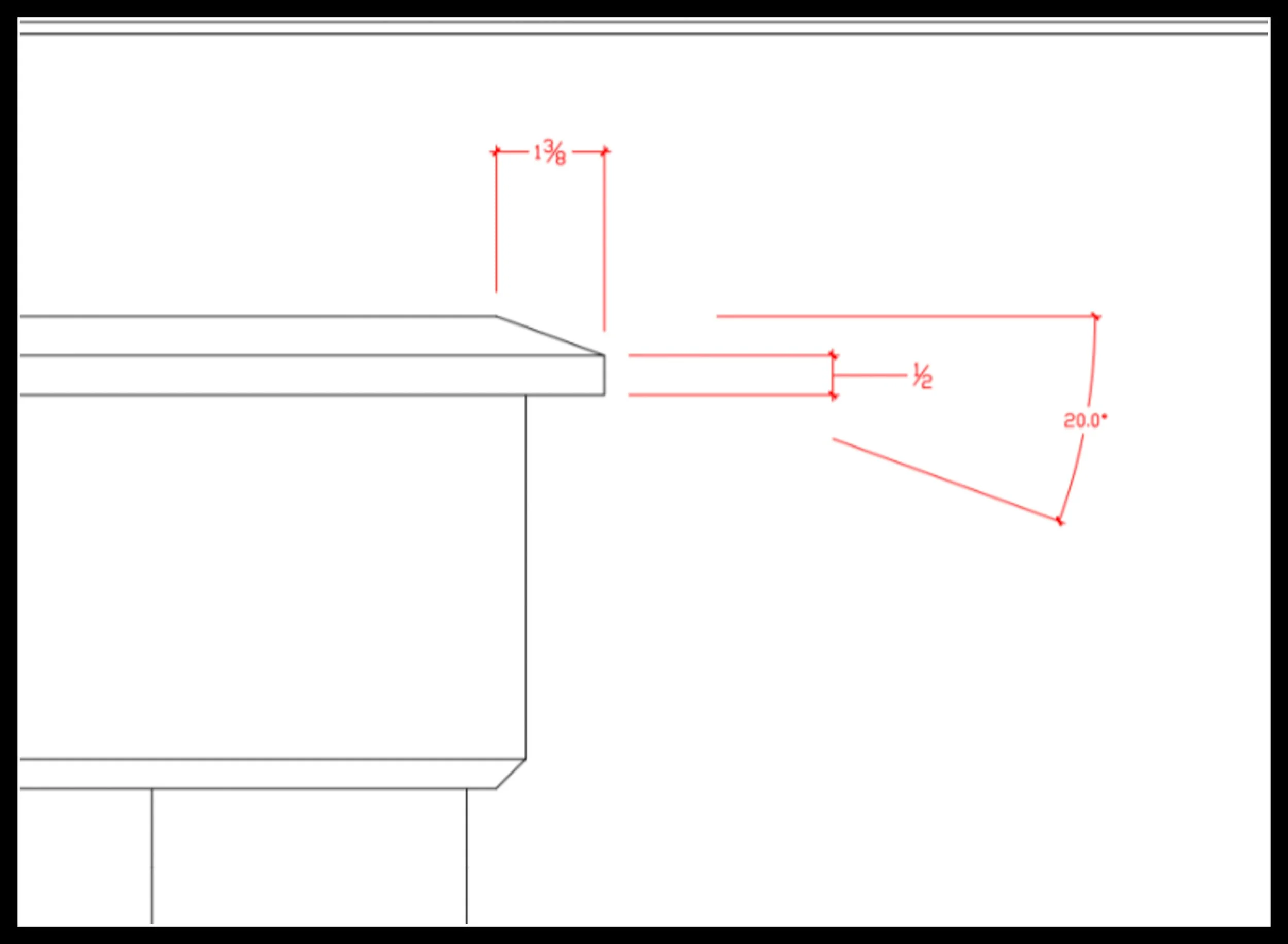
A bevel is one of the clearest ways to lighten a thick tabletop, and here a 20‑degree angled bevel immediately changes how the mass is read. By angling the underside of the top at this shallow, architectural angle, the visible thickness drops and the edge becomes a crisp transition instead of a blunt block. A 20° bevel doesn’t just remove material — it reshapes the silhouette. On a tall 40‑inch table, this matters even more: height pushes the top into the viewer’s line of sight, exaggerating its heaviness. The bevel cleanly delineates the top from the air around it, creating a refined edge that feels intentional rather than overbuilt. It’s a simple geometry tool that dramatically improves the table’s presence without altering a single measurement.
Step 4 — Lightening the Top With a 20° Bevel
Next thing I looked at was the edge treatment of the top. Instead of a bead or a round‑over profile, I used a 20° bevel. The bevel splits the thickness of the top, leaving a ½‑inch flat that leads into a 1⅜‑inch bevel.
This is not a common edge profile — but this is not a common table. We’re trying to reduce visual weight, and this table needs all the help it can get.
A bevel is another layer, another plane, another surface light reflects from. It breaks the mass of the top and gives the eye something to travel across instead of stopping at a blunt edge.
At this point my mind is fully in build mode — setting up router tables, thinking about tapering jigs, imagining tear‑out and how I’d fix it. We’re woodworkers, and naturally we think this way. This is what I mean when I say I design from the bench.
But it’s important to ignore those thoughts until the full design is realized. Worry about the shop problems later. Right now, just get the design without shop stress.
Reveal Added at the Top of the Skirt
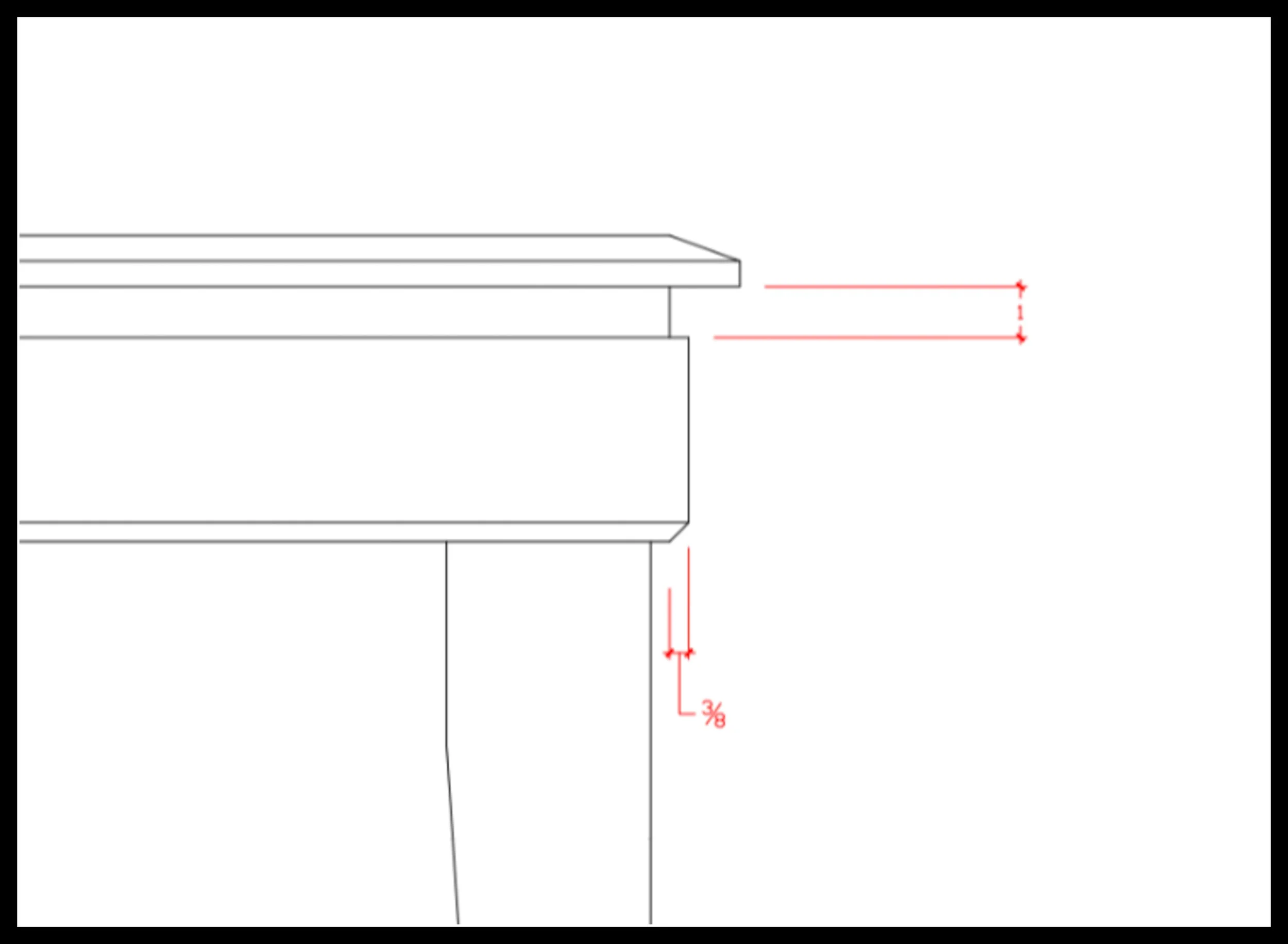
A reveal at the top of the skirt is one of the simplest ways to create deliberate separation in a design. By stepping the skirt back even a small amount, you introduce a crisp shadow line that immediately lightens the mass of the top. The eye reads the gap as intentional geometry — a thin band of darkness that breaks the blocky silhouette and clarifies where the top ends and the base begins. On a tall 40‑inch table, this delineation becomes even more important: height pushes the top into the viewer’s line of sight, exaggerating its thickness. The reveal restores balance by giving the top a clean visual boundary, proving how a subtle shadow line can refine the entire presence of the piece without changing a single measurement.
Step 5 — Lightening the skirt With a Reveal
Right now the top still looks heavy. It needs more visual relief. So I added a reveal at the top of the skirt, just below the table top.
The reveal is 1 inch wide and ⅜ inch deep. It’s a big reveal — but it works. The table immediately looks lighter. There’s now a sense of space under the top, separated from the skirt, or at least it appears that way.
It’s a shadow line — and a big one.
This reveal lightens the silhouette almost as much as the leg taper did. And geometrically, we’ve added even more shape by removing mass from the top of the skirt. Now the skirt, reveal, and top look stacked. That’s three layers working together, combining undercuts, shadow lines, and bevels to reduce visual weight.
The design is starting to look refined now — intentional.
Surface Detail Added to the Skirt
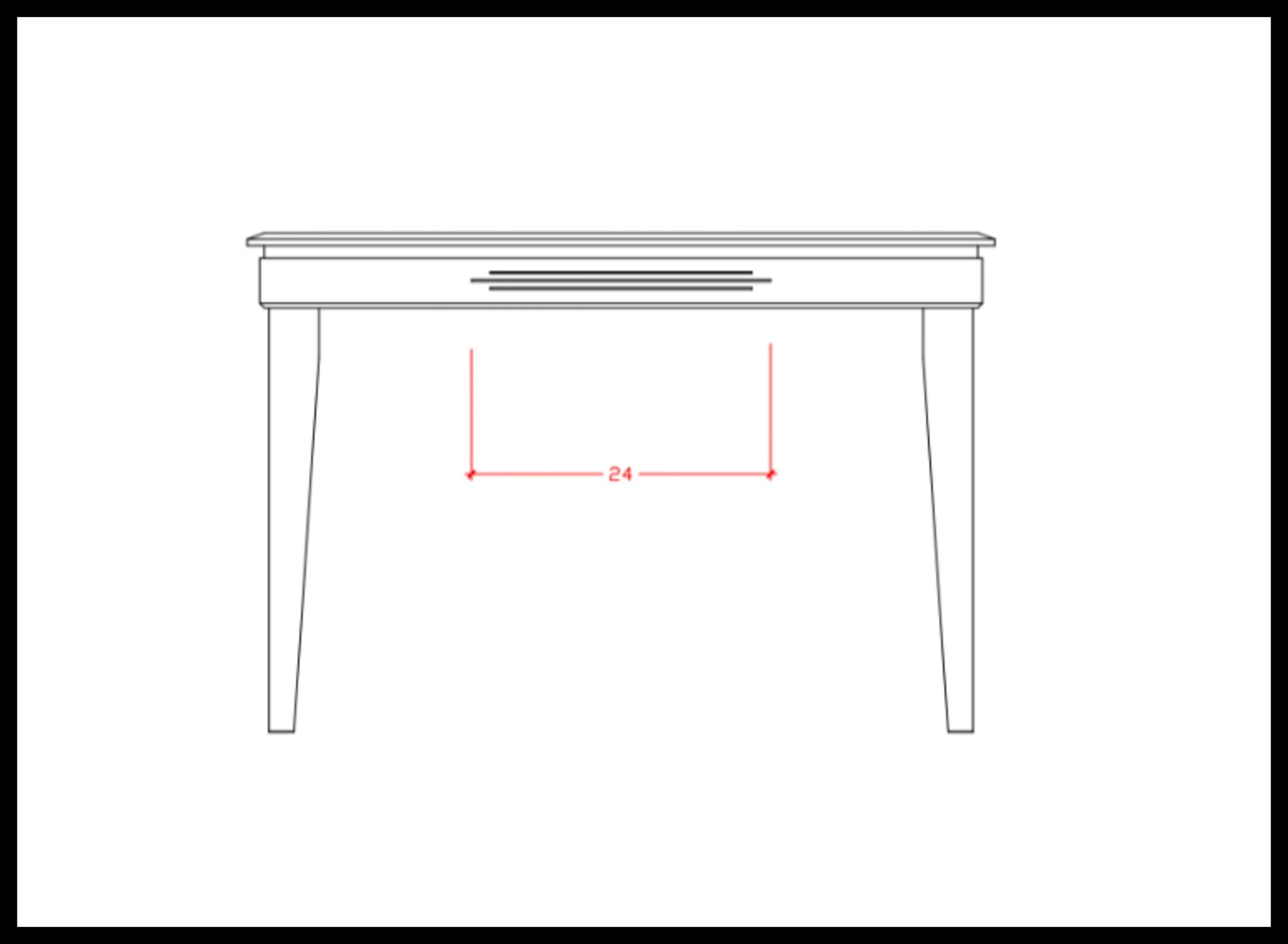
A small 1/8‑inch horizontal fluting added to the skirt is one of the quietest ways to refine a heavy table. That thin recessed line creates a controlled shadow that breaks up the mass of the skirt, giving the design a moment of empty space — a pause — that lightens the entire profile. Because the detail is shallow, the eye doesn’t register it as ornament; it reads as geometry. On a tall 40‑inch table, this matters even more: height exaggerates thickness, and any uninterrupted surface feels heavier. The fluting introduces a deliberate shadow line that clarifies the boundary between the top and the base, proving how a subtle surface detail can add refinement, precision, and visual relief without changing a single measurement.
Step 6 — Adding Surface Detail to Break Up the Mass
Now I see a layered top: a skirt with an undercut and a reveal, and a beveled top sitting above it. But even with all that, the piece still feels heavy. The geometry is done — there’s nothing left to cut, taper, or bevel.
So I decided to add a surface detail. Something small. Something for the eye to focus on that distracts from the thickness of the top. Just some simple fluting — three lines at ⅛ inch thick.
It’s subtle, but it’s enough to draw the eye and center the design.
I often hear complaints in the shop that fluting is purely decorative and not needed. And in some cases I would agree. But not here. We’re not building a workbench — we’re building a centerpiece. And in this case, the leg tapers, undercuts, reveals, and beveling the top were all done to reduce visual weight. Fluting adds to the same cause. It’s just as necessary as the other design cues.
The fluting breaks up the big surface of the skirt. It’s a shadow line, and it’s intentional. It’s definitely not a mistake — it was a decision. A place of focus. And when people see it, they touch it. It adds interest to an area that had none. It adds refinement and skill. It builds toward the finished design.
Reveal Added to the Legs
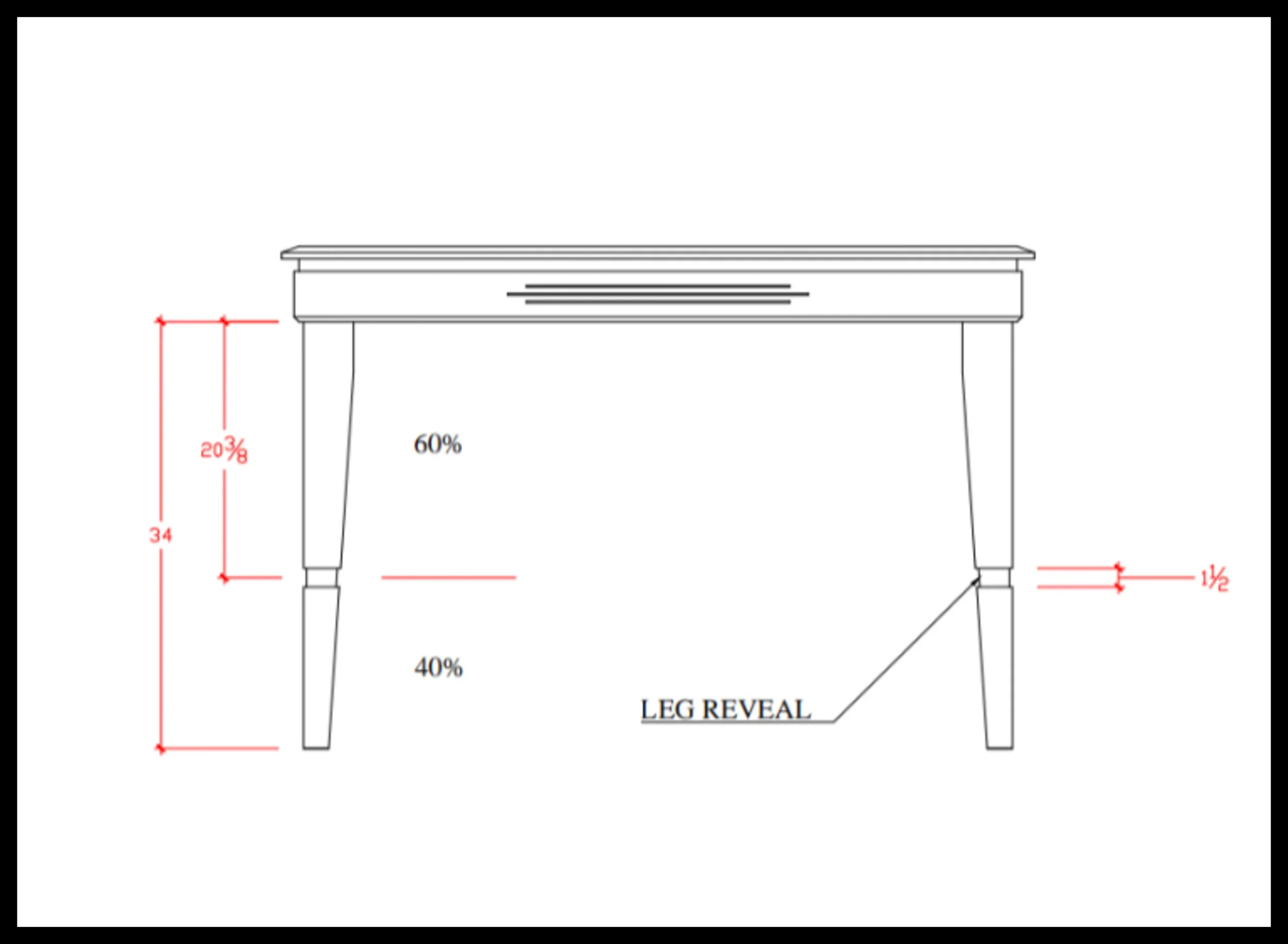
A small reveal cut into the legs is the final refinement in this progression, and it has an outsized effect on a tall 40‑inch table. By introducing a precise recess at the 60/40 split, the leg gains a clean visual break that both thins the upper section and clarifies the transition between the top and the base. Placement is everything — too high and the table reads unstable, too low and the detail disappears into the lower mass. Set correctly, the reveal becomes a controlled shadow line that delineates the table’s geometry and adds a moment of intentional empty space. With this final cut, the table now carries all four major design tools: bevel, undercut, taper, and shadow line. The original silhouette hasn’t changed in measurement — only in geometry — and that shift alone makes the table feel refined, balanced, and fully articulated.
Step 7 — Adding a Leg Reveal to Correct the Height
At this point the table is shaping up, but it’s still not feeling right. Most of the visual weight has been dealt with, but the piece still feels heavy — and a bit tall. That “tallness” isn’t a measurement problem; it’s a visual proportion problem.
So I added reveals in the legs. If the table could walk around, these would be the knees.
The reveal is ¼ inch deep and 1½ inches across. Place these too high or too low and the whole table looks wrong. Instead, use the 60/40 split. I wrote about this in another story, but here’s the short version:
Measure the leg from the bottom of the skirt to the floor. Take 60% of that number — multiply by 0.6. That gives you the measurement down from the skirt. Draw a line, then center the reveal over that line. This places the reveal in a naturally balanced position.
That placement looks right. It’s a shadow line that corrects the height visually, making the table feel grounded instead of stretched.
When I first designed this table, I thought it was done at this point. Then I came back later, took another look, and still felt something was off. It’s that feeling when the design is close — but not quite there. The leg reveal made massive strides toward a finished design, but there was still room for one more thing.
Drawer Added
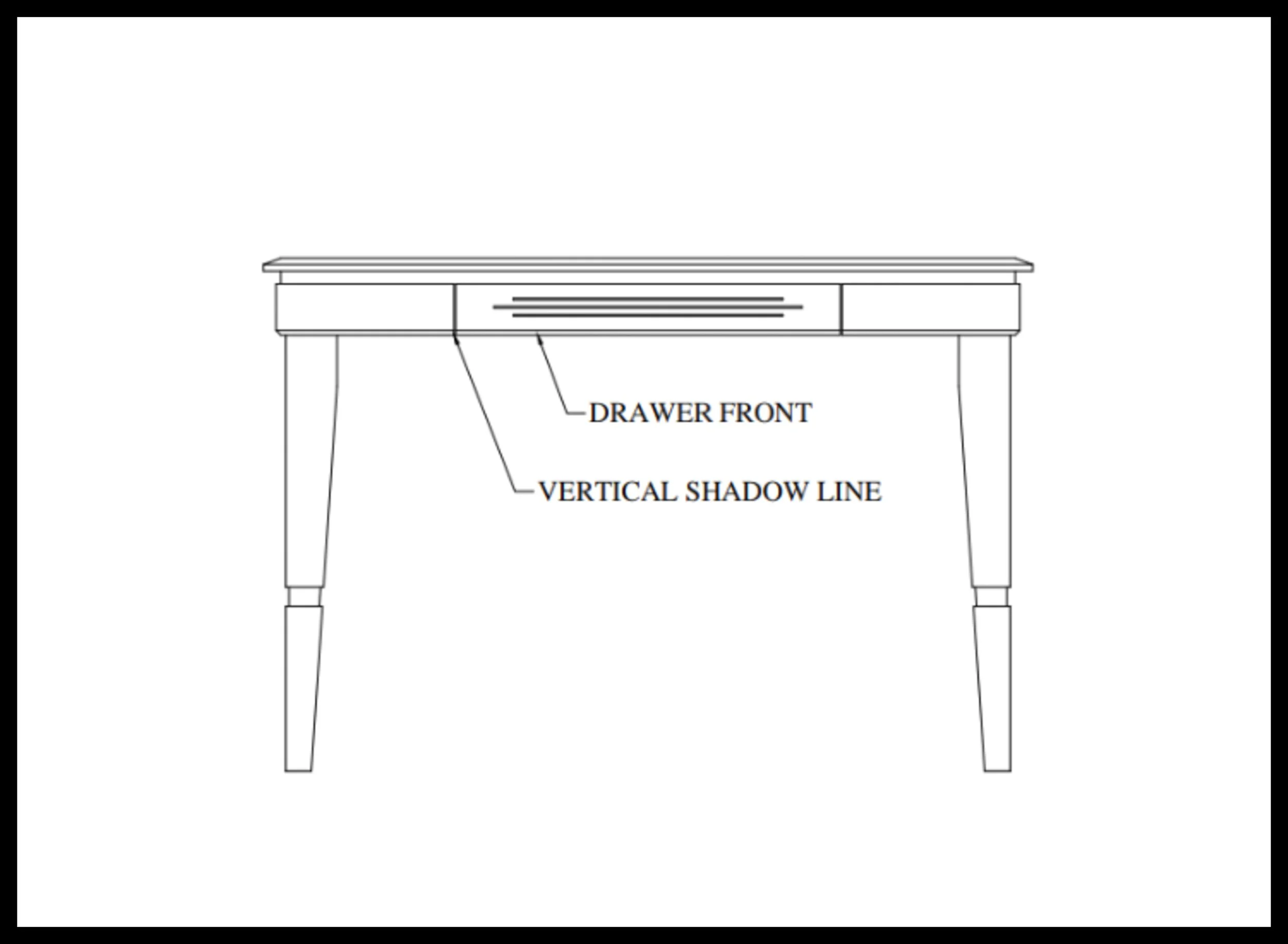
Adding an inset drawer introduces one more controlled geometric break into the design. The drawer front sits inside the opening, creating two precise vertical gaps — functional reveals that also act as shadow lines. Because the drawer is inset and the fluting provides the tactile cue, no pull is needed; hardware would only add noise. These two recesses add depth and curiosity, pulling the eye into the form and reducing the perceived weight of the front elevation. The gaps clarify the drawer boundary, thin the surrounding skirt, and extend the same geometric logic used across the top, skirt, and legs. With this final addition, the table gains storage while staying dimensionally unchanged — the geometry is more articulated, more aligned, and complete.
Step 8 — Adding a Drawer: The Final Shadow Line
What I decided was to add a drawer. The drawer gaps add two vertical breaks on either side of the fluting. It’s minor, but it centers the skirt. The drawer front is inset and in the same plane as the rest of the skirt. It’s a small detail — just that last touch, a vertical shadow line.
But a drawer is more than geometry. It’s both function and design. Yes, it adds much‑needed shadow lines. But more importantly, people love drawers — and you do too. The table gains an unseen element, a storage system, and people will open it. It’s human nature to inspect the hidden secrets within: how it’s built, how smoothly it rolls, how big it is, and what you’ve got in there.
That added value is tremendous and under‑appreciated when designs are made.
What I’m saying is that this is far more than two shadow lines. It’s a hidden design secret you already knew instinctively but may not have realized. If the furniture is designed well, you feel it — and a drawer like this will get opened. Because the design invites it. And all it takes is two vertical shadow lines.
People will need to check. They’ll think it’s a drawer, and that need to understand whether it is or isn’t pulls their eyes to the center of the skirt. Hands reach out to test the possibility. That curiosity is part of the design — and part of the value.
The fluting doesn’t allow for a metal pull — and it doesn’t need one. Instead, a finger pull can be routed from the back on the underside of the drawer front. A detail discovered through touch, not seen. A small surprise. A quiet refinement.
Conclusion — The Geometry of Good Design
Design isn’t one big decision. It’s a series of small ones. Each cut, each bevel, each shadow line reduces weight, adds refinement, and guides the eye. None of these steps were complicated. None required special tools or advanced joinery. They were simple choices — but they stacked.
A taper lightens the legs. An undercut lifts the skirt. A bevel breaks the mass of the top. Reveals add proportion. Fluting adds focus. A drawer adds curiosity.
Every move was easy. But together, they transformed a heavy table into a refined one.
This is the part most people miss: design is cumulative. You don’t fix visual weight with one dramatic gesture. You fix it with layers — with geometry, with shadow, with proportion, with human behavior. You fix it by paying attention to what the piece feels like, not just what it measures.
And when all those small decisions line up, the table stops being a project and becomes a piece of furniture. Something people notice. Something they touch. Something they interact with. Something that feels right, even if they can’t explain why.
That’s the quiet geometry of furniture. And it’s built one simple decision at a time.
In short
Thickness isn’t just a measurement — it’s a visual weight decision. Bevels, tapers, undercuts, reveals, and shadow lines don’t change dimensions, but they completely change how a piece feels. Refinement comes from geometry, not size — one small decision at a time.
Same Dimensions, Completely Different Presence
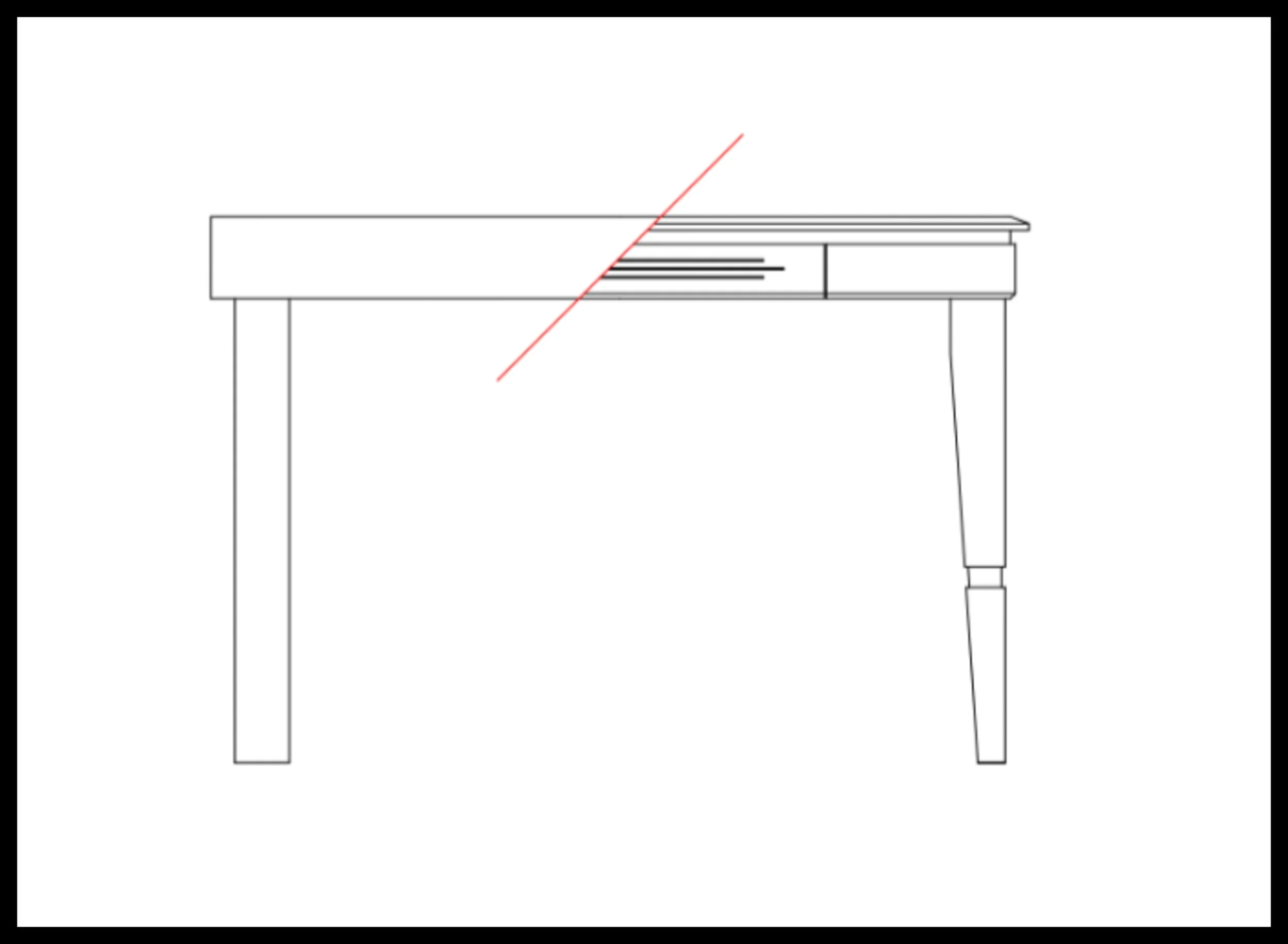
The final comparison shows the original heavy form beside the refined design, both drawn at the exact same size. Nothing about the overall measurements has changed — the table is still the same height, width, and thickness — yet the geometry reads entirely differently. Bevels, undercuts, tapers, reveals, and shadow lines work together to lighten the mass, clarify boundaries, and articulate every transition. This side‑by‑side view makes the lesson unmistakable: refinement comes from geometry, not from changing dimensions.
Digital to Sawdust — Design Studio
Digital tools, layout, and proportion — the design side of woodworking before the sawdust begins.
SHARE
Digital to Sawdust — Design Studio
Lessons in woodworking design, geometry, and digital layout — teaching how furniture is shaped with intention.— head to the Design Studio. Just one click away.
If you’d like to hear from me only when something big is happening — a launch, a milestone, or a major project — you can join the mailing list below.
Written by David Flather, Red Seal cabinetmaker and founder of Knotty Dave’s Fine Woodworking — a Manitoba shop rooted in heritage restoration, storytelling, and real craft.
All photos shot by David Flather — in the shop, on the road, and in the places where craft and story meet.
Related stories:
Visual Weight in Woodworking: How Proportion Shapes the Feel of Furniture
The Quiet Geometry of Furniture: How Curves Change a Room, Softening Rectangular Design
Woodworking Design: Getting It Right: The 60/40 Rule for Better Design Balance
The Workshop Library
If you enjoyed this story, there’s lots more like it inside The Workshop Library — and it’s free to explore.
Wood Archive — species, grain, working properties, and real‑world craft notes
Behind the Grain — the deeper stories inside wood, craft, and heritage
The Working Side of the Craft — tools, shop life, workflow, and the realities of making
Digital to Sawdust — Design Studio — geometry, proportion, visual flow, and design thinking
The Stories of the Shop — the personal side of craft, the shop’s history, and the quiet moments that shape the work
House & Hearth — heritage home restoration, the hearth room, winter culture, and the lived‑in side of craft
I’m just one man with a shop, building this archive one story at a time. If you’d like to follow the journey as it unfolds, explore The Workshop Library — new stories every week.
